Dashboard & Navigation
Your command center. The dashboard provides a real-time snapshot of your individual and team-wide HR activities.
The Global Top Bar
Accessible from any page, the top bar provides quick access to notifications, global search, and your profile settings.
Global Search
Find employees or specific modules instantly.
Smart Alerts
Real-time alerts for approvals and deadlines.
Time Tracker
Daily clock-in/out status at a glance.
Operational Widgets
The main dashboard contains dynamic widgets tailored to your role.
Pending Approvals
Exclusive to Managers & Admin
A consolidated view of Leave, Overtime, and Expense requests awaiting your verification.
Upcoming Leaves
Tracks both your personal upcoming time-off and your team's schedule to prevent overlap.
Learning Path
Quick access to mandatory training sessions and upcoming development workshops.
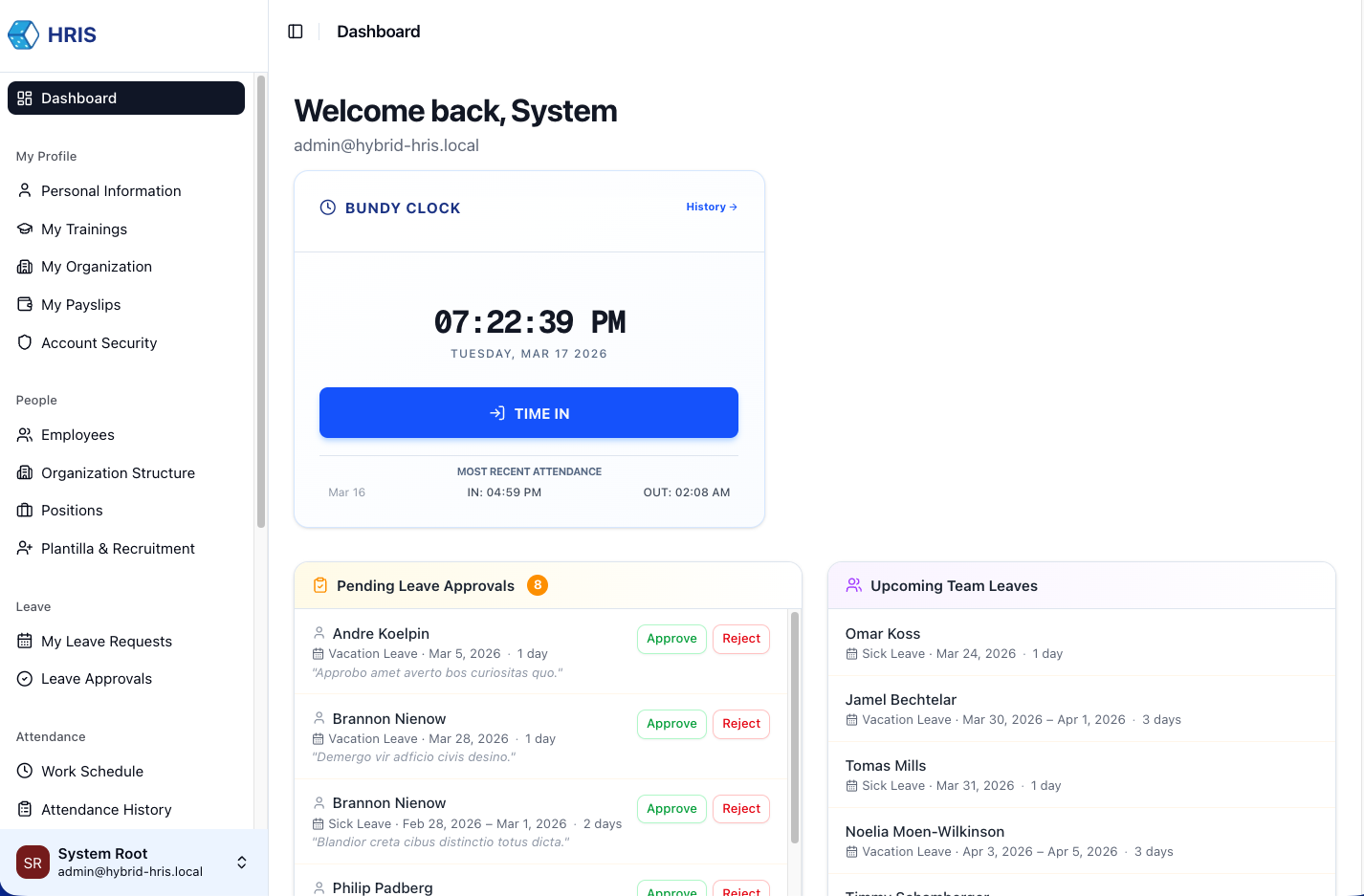
Category-Based Sidebar
The Sidebar is grouped into logical modules to streamline your workflow:
- Administration: Core systems & Org control.
- Employee Center: Your personal HR portal.
- Financials: Payroll & Expense tracking.
- Attendance: Time tracking & Shifts.